Submitted sessions awaiting verdict. Oldest first. Approve sends the session to Archived; Decline sends it to Declined and the audit notes show on the tester's banner when shared.
All registered profiles. Manage Corp membership, probation state, and manual score adjustments. State changes here apply immediately — the Phase 1 triggers (probation lift at clean=10, fail at decline=5, veteran drop at peak-score gap > 10) still fire when you update the counters, so this is also how you exercise the state machine without doing real survey work.
Beta-access applications from logged-in non-members. Pending first. Approve grants full Corp membership immediately (corp_member, state active). Deny leaves access blocked.
Session details
Reviewing flagged cluster…
Sign in to your Survey Corp account
Enter your email and we'll send you a reset link
Tap ✓ to confirm a row's value is correct as-read, or tap ✎ to switch the row to inline-edit and type the right value.
Submit fires once you've touched every row. If any rows are still unmarked when you click Submit, you'll get an "are you sure?" confirmation first.
Reset wipes your check / edit state and restores the original OCR values, so you can start over without re-snapping.
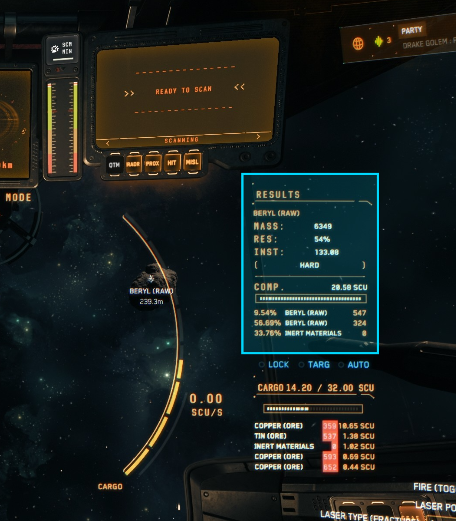
Drag a box around the scan-results panel, then click Get Data.
— ×
If the count is off, correct it here — an adjusted count is flagged for admin review. For a wrong material, hit Re-snap and try a tighter box around the labels.
This is what you're looking for in your screen-grab.
Are you sure?
Update how you appear across the Survey Corp.
The Surveyor has been upgraded — cloud OCR, faster captures, real ranks. Your account, history, and rank carry forward. Pick Survey Ops when you're ready to log scans.
Survey Ops is gated to Survey Corp members. Apply for beta access below — an admin reviews every request.
Choose Yes (Coverage) if you'll scan every cluster you come across this session (count + material type — detailed rock/node scans are optional). A representative sample of the area, used for coverage and material-distribution maps.
Choose No (Prospecting) if you're only after specific high-value rocks or gems — your scans still contribute quality and material-existence data, just not coverage stats.
You can change your scanning approach mid-session, but the coverage intent is set once at session start. Start a new session if you want to switch modes.
Will you scan every cluster you come across this session?
Yes (Coverage) = your data feeds coverage and material-distribution maps. No (Prospecting) = quality data still counts, just not coverage stats.
Archived & declined surveys — open one to review, edit, or delete records.
Corp surveyors ranked by score. Earn points by submitting surveys.
Read a number off your in-game HUD, scan the row, identify the ore.
| Ore | 1 | 2 | 3 | 4 | 5 | 6 |
|---|